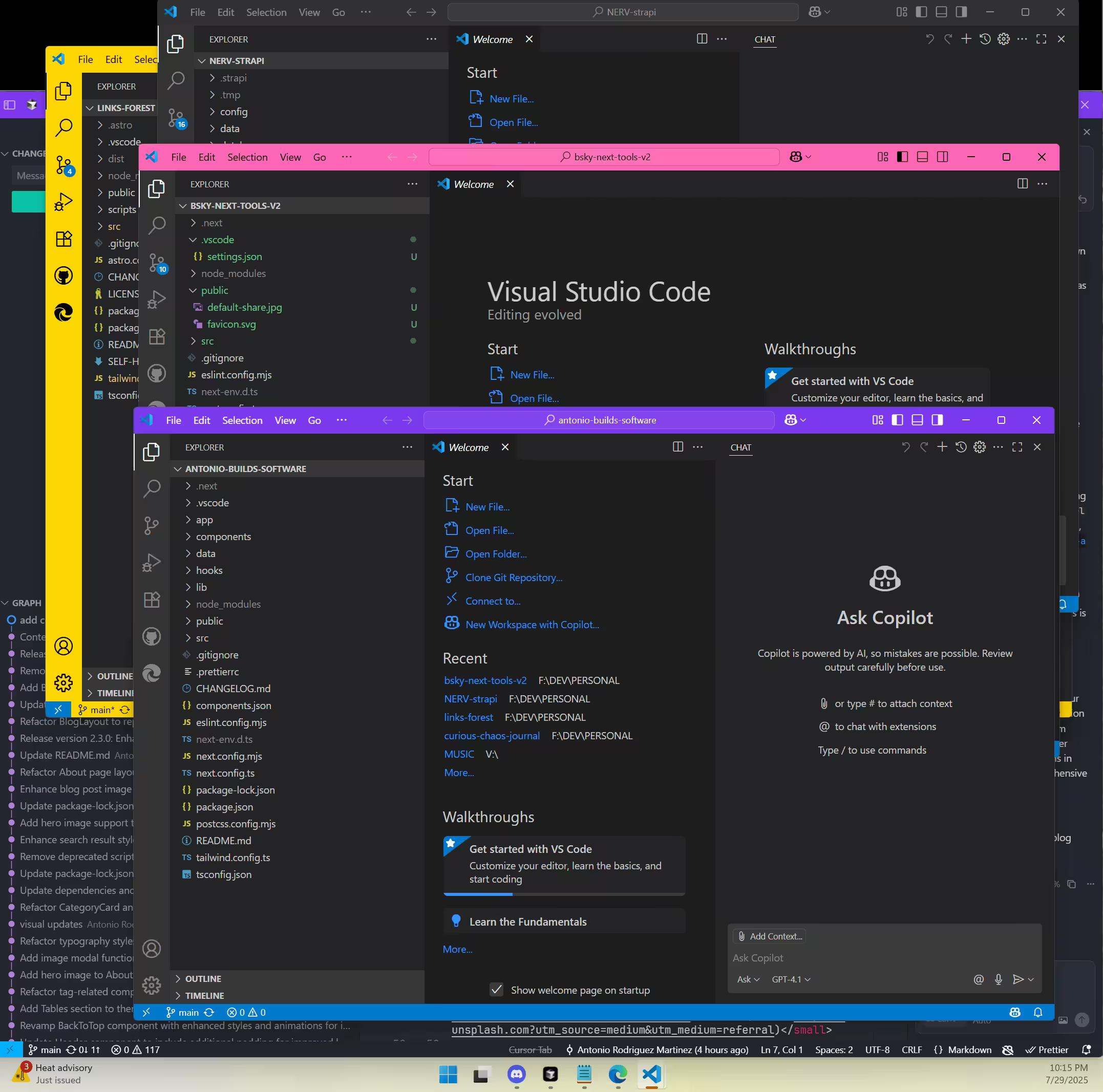
🎯 PURPOSE
Modern developers multitask across systems, moods, and levels of importance. This system allows you to:
- Immediately recognize where your focus is.
- Visually separate critical systems from creative zones.
- Avoid context-switch fatigue.
- Bring emotional intelligence into your toolchain.
By using title bar colors in VS Code as visual metaphors, we reinforce intentionality.
🛠️ HOW IT WORKS
Each project folder can contain a .vscode/settings.json file with a unique title bar color:
{
  "workbench.colorCustomizations": {
    "titleBar.activeBackground": "#006400",
    "titleBar.inactiveBackground": "#004d00",
    "titleBar.activeForeground": "#ffffff"
  }
}
This is per-project and auto-applies when opening that folder in VS Code.
🔢 TITLE BAR LEVELS
| Level | Color Hex | Purpose |
|---|---|---|
| 🔴 CRITICAL | #8B0000 / #5A0000 | Production systems, finance, legal ops |
| 🟠 WORK | #FF8C00 / #CC7000 | Focused development, job-related work |
| 🟡 SUPPORT | #CCCC00 / #999900 | Utility tools, backups, API clients |
| 🟢 FUN | #006400 / #004d00 | Creative and joyful projects |
| 🔵 LEARNING | #1E90FF / #0B73D9 | Tutorials, sandbox, experimentation |
| 🟣 PERSONAL | #8A2BE2 / #6A1BA2 | Writing, rituals, personal growth |
💡 CODE SNIPPETS FOR EACH LEVEL
🔴 CRITICAL
{
  "workbench.colorCustomizations": {
    "titleBar.activeBackground": "#8B0000",
    "titleBar.inactiveBackground": "#5A0000",
    "titleBar.activeForeground": "#ffffff"
  }
}
🟠 WORK
{
  "workbench.colorCustomizations": {
    "titleBar.activeBackground": "#FF8C00",
    "titleBar.inactiveBackground": "#CC7000",
    "titleBar.activeForeground": "#ffffff"
  }
}
🟡 SUPPORT
{
  "workbench.colorCustomizations": {
    "titleBar.activeBackground": "#CCCC00",
    "titleBar.inactiveBackground": "#999900",
    "titleBar.activeForeground": "#000000"
  }
}
🟢 FUN
{
  "workbench.colorCustomizations": {
    "titleBar.activeBackground": "#006400",
    "titleBar.inactiveBackground": "#004d00",
    "titleBar.activeForeground": "#ffffff"
  }
}
🔵 LEARNING
{
  "workbench.colorCustomizations": {
    "titleBar.activeBackground": "#1E90FF",
    "titleBar.inactiveBackground": "#0B73D9",
    "titleBar.activeForeground": "#ffffff"
  }
}
🟣 PERSONAL
{
  "workbench.colorCustomizations": {
    "titleBar.activeBackground": "#8A2BE2",
    "titleBar.inactiveBackground": "#6A1BA2",
    "titleBar.activeForeground": "#ffffff"
  }
}
🚀 SETUP INSTRUCTIONS
- Decide project intent (e.g. FUN, CRITICAL, WORK).
- Copy matching template to your project: cp ~/Developer/templates/vscode-green.json ~/Developer/projects/my-project/.vscode/settings.json
- Open the folder in VS Code — it will apply automatically.
🧠 GLOSSARY OF TERMS & VALUES
Context Signaling — using visual cues to indicate intent
Gradient Thinking — layering focus/priority levels
Ambient Focus — soft nudges that enhance attention
Cognitive Load — mental overhead from multitasking
Presence — full awareness of the current context
Autonomy — control over your work rituals and pace
Symbolic UX — UI that encodes emotion, not just logic
Visual Metaphor — colors = meaning, aligned with mindset
📚 REFERENCES
- Norman, D. A. — The Design of Everyday Things
- Nielsen, J. — Usability Heuristics
- Fitts, P. M. — The information capacity of the human motor system
- VS Code Theme Color API (official)
Thank you for exploring these references!
🔮 NEW PARADIGMS THIS SUPPORTS
- Mental Model Hygiene — cleaner internal RAM
- Tools as Ceremony — your editor becomes a ritual space
- Neurodiversity Support — great for visual/spatial learners
- AI & Context Awareness — layered states encoded visually
🔭 NEXT STEPS & IDEAS
- Extend to terminal title bar colors (iTerm2, etc.)
- CLI tool to switch project levels dynamically
- Add icon and emoji indicators to VS Code explorer
🧭 SUMMARY
You’re not just working in a text editor. You’re commanding a cognitive control center built for intention. Use this color-coded system to own your presence, guide your focus, and never forget who you are and where you are.

Leave a note
Share a thought or ask a question in the comments.
For a private note, you can email me at antonio@builds.software.
Comments will load when you reach this section.